
Self-service Portal FAQs

Is the email used for sending requests and issues relating to ARDC products and services changing?

Our support email will NOT change. services@ardc.edu.au will remain the primary email address for all your services-related requests or issues however, we encourage everyone to take advantage of the forms available in the Self-service Portal.

What are the differences between the existing ARDC Service Desk and the new Self-service Portal?

The ARDC will continue to use the Atlassian suite of products for managing user requests and issues. Below are some similarities and differences between the current ARDC Service Desk (SD) implementation and the new Self-service Portal:


ARDC Service Desk (SD)

Self-service Portal (HELP)

Atlassian product

Yes. Jira server (on-premise)

Yes. Jira Service Management (Cloud)

Auto-generation of issues from emails sent to services@ardc.edu.au

Yes. But it will stop creating SD issues on 27 Feb 2024

Yes. It will start creating HELP issues on 27 Feb 2024

Online forms for each request type

No. Not applicable

Yes. Online forms are available and grouped per product/service

Anonymous request or issue submission (not via email or services ‘Feedback’ form)

No. To submit a request in SD, users are required to login to Jira.

Yes. Email address, in addition to the required fields in the form, must be provided. Email addresses are not validated but are used to send notifications and/or to sign up to the self-service portal.

Integrated Knowledge Base

No. The Services User Guides (formerly called Technical Documentation Portal), https://documentation.ardc.edu.au is separate from SD

Yes. Documents or pages published on the Services User Guides, https://documentation.ardc.edu.au , are easily accessible from the Self-service Portal’s ‘Search’ box.

Issue keys

SD (eg. SD-1234)

HELP (eg. HELP-1234)

Email Notifications

Yes. Users are notified of any comments, status updates and edits that are available to users (note that internal comments are not visible to users)

Yes. Users are notified of any comments, status updates and edits that are available to users (note that internal comments are not visible to users)

What is the new URL of the Self-service Portal?

The current URL, https://jira.ardc.edu.au, will transition to read-only mode post-migration. Users can access the self-service portal at https://my.support.ardc.edu.au which will be accessible starting 20 Feb 2024.

How do I access the new portal? Will I be able to use my existing legacy Jira account to access it?

Non-logged in users will be able to send a request without logging in to the portal. However, you are required to enter a valid email address when submitting a required. This will ensure that you are automatically notified of all the updates relating to the issue(s) you raised.

In order to view all issues or requests raised by the user, login is required. However, you cannot use your existing SD account to login to the Self-service portal. You would need to register as a new user:

  • ARDC Staff: Simplified login using ARDC Google accounts, streamlining access.

  • External Users: Self-registration using email addresses, enhancing accessibility. When you send a request as a non-logged in user, you will have the option to create your own account or self-register using your email address. Instructions on how to self-register is available in one of the tabs on this page.

What will happen if I reply to emails with the legacy SD issue in subject?

Because the legacy Jira will be read-only after the migration, you will no longer be able to update the issue. You will, however, receive a new issue reference number starting with “HELP” (eg. HELP-123).

This new HELP issue will:

  • be accessible from the ARDC Self-service portal (login required)

  • contain the information available in the current email but not he historical data or attachment from the legacy SD issue

  • will be updated to have links or attachments that contain the information from the legacy SD issue (please refer to the next FAQ 'What will happen to the legacy Jira system? Are we still able to access our old issues?” for more information

What will happen to the legacy Jira System? Are we still able to access our old issues?

The old Jira system will be available as a read-only system for a short period of time. The ARDC Services team will endeavour provide users with access to them if and when necessary. There are 2 options we are looking at but rest assured that we will let you know how you can access your old issues after the migration:

  • Option 1: Migrate the old issues to the cloud and make them available via the self-service portal

  • Optin 2: Provide users access to information available in the old issues if and when necessary. This may be in the form of a PDF file attachment or other means.

Will the issue reference numbers/keys still have the format SD-XXXX?

No. New Jira issues will start with 'HELP' (e.g., HELP-123).

How will I know the status of my request or issue?

You will be notified via email if and when there are activities or updates on your issues.

If you want to check the status of your request, simply login the Self-service Portal and then click the ‘Requests’ button next to your user icon on the top right corner of the portal as per screenshot below, and all your issues will be displayed.
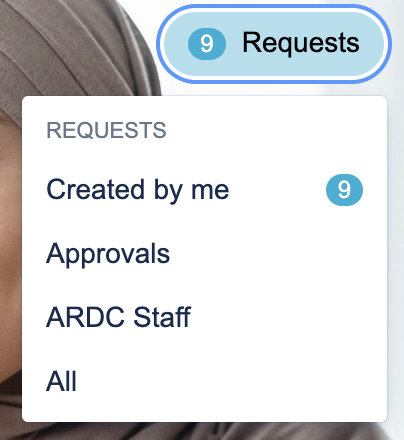
Screenshot 2024-02-06 at 11.35.54 pm.png
  • If you were added as an approver of an issue, use the ‘Approvals’ filters to view them.

  • The numbers on the side of each facet or filter indicate the count of issues

Use the available filters/facets to refine your search results or display. Click on the ellipsis (…) then ‘Manage columns’ to select more columns to display.
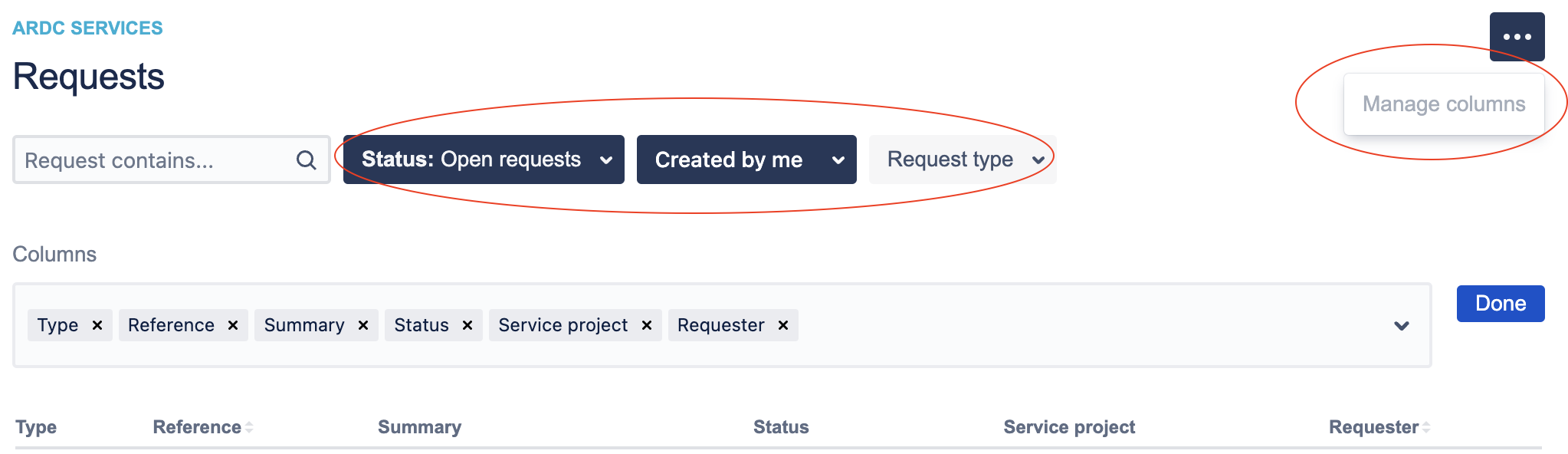
Screenshot 2024-02-06 at 11.46.55 pm.png
What is Knowledge base and how do we use it?

A knowledge base is an online library of information about an ARDC service, work instructions, processes or procedure documentation and guides.

  • Direct and efficient search: Our updated knowledge base within the user portal allows you to quickly find articles and documentation from the Services User Guides. Just type your query into the search bar, and relevant suggestions will appear in real-time.

Screenshot 2024-02-06 at 10.47.22 pm.png
  • Direct Issue creation: Should users not find their answers in the knowledge base, they can seamlessly raise an issue directly from within the portal. This feature is designed for intuitive use and efficiency. To raise a request, simply click on the link down the bottom of a page you are viewing (refer to screenshot below) and you will be redirected to the portal to raise a request.
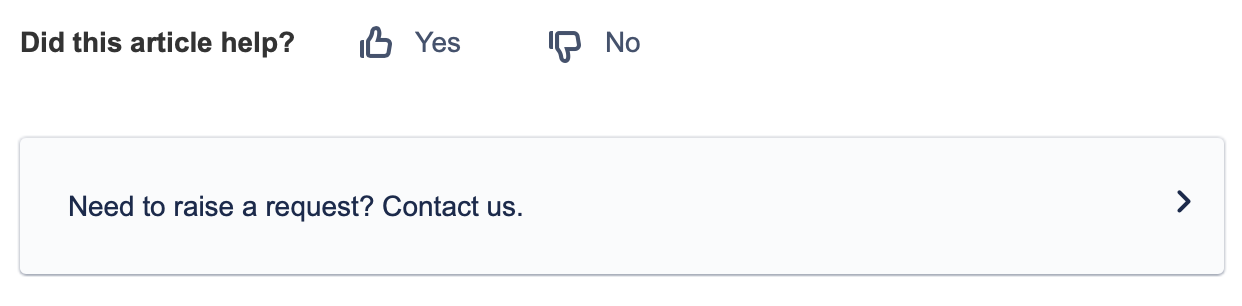
Screenshot 2024-02-07 at 9.15.01 pm.png
  • Barrier-free support: Our enhancement is geared towards eliminating obstacles in the user support experience. With this integration, users can access the help they need without navigating through additional steps or facing any unnecessary barriers, ensuring a smoother and more user-friendly process.